Customer Verification Documents
Upload files and documents at customer registration—passport, ID card, identification photos. Shopware verification extension with admin approval workflow.
Requires Shopware 6.7.3 or newer.
Screenshots
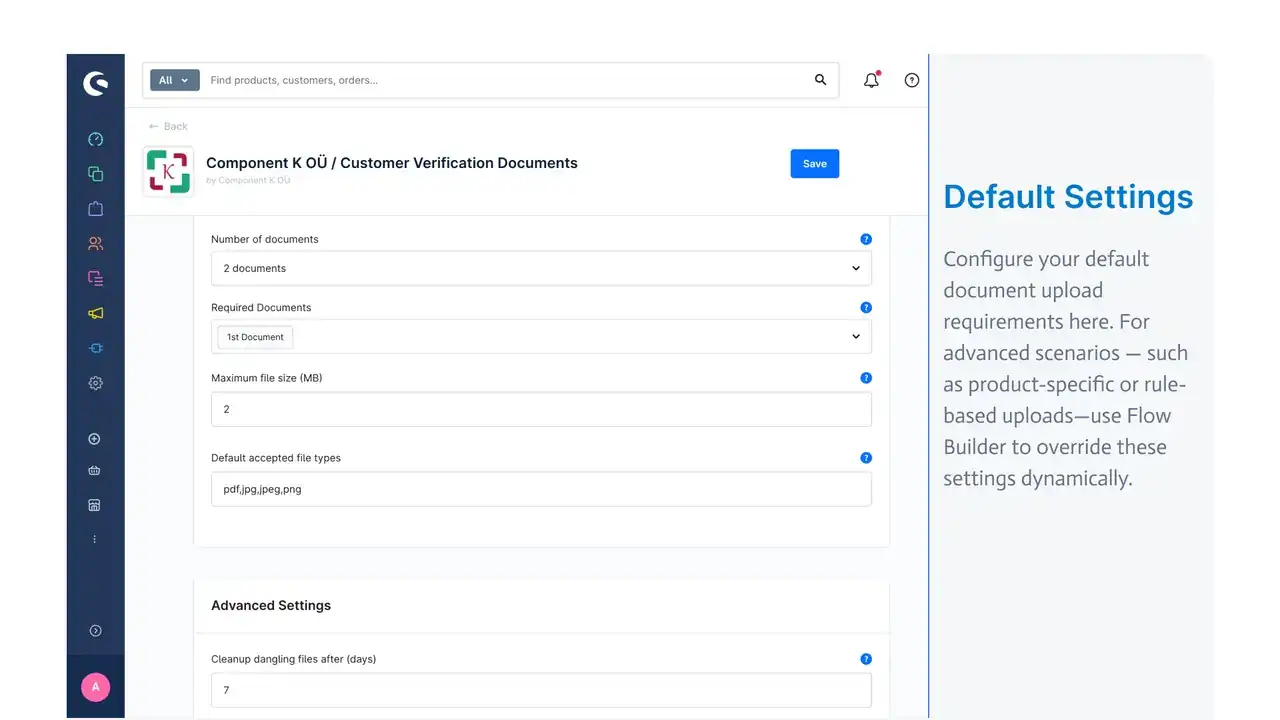
1 / 13
The problem
Shops that need ID checks, age verification, professional licenses, or other proof of eligibility usually bolt this onto registration with custom code or manual email requests. That means slow reviews, no audit trail, and no easy way to react automatically when a shopper’s status changes.
Customer Verification Documents turns this into a configurable workflow: shoppers upload the right files at the right moment, admins review and approve them from one screen, and every status change can trigger an email, a flow, or an API call.
What makes it different
- Conditional upload fields via rules — Flow Builder rules decide when upload fields appear, so requirements can follow cart contents, customer group, or any other condition instead of being hard-coded to a single page.
- Full admin approval workflow — review, approve, reject, or request a re-upload with a click, with bulk status management for larger queues.
- Flow Builder automation end to end — dedicated events for every status transition and for registration with or without documents, plus a reusable rule and a cart action to react to unfinished applications.
- Six ready-to-use email templates — approved, rejected, missing files, registration without files, admin review reminders, and admin notices for new registrations.
- Complete Store and Admin APIs — build headless upload flows or automate review from the outside, with granular permissions for every endpoint.
- Private file storage — documents are written to private media storage, never exposed publicly, with automatic cleanup of orphaned files.
Features
Configuration
- Configurable document upload fields, with required vs. optional documents per field
- File size limits and allowed file types
- Translated labels and help text for every upload field
- Configurable logging, from information only up to critical issues, with rotating log files
- Scheduled cleanup of outdated or orphaned files
Flows & automation
- 6 pre-built Flow Builder templates for quick setup
- Custom Flow Builder events, actions, and rules
- Events for every application status transition, for cart visits, and for registration with or without documents
Admin experience
- Review, download, approve, upload, or delete individual customer documents
- Update application status and optionally notify the customer with a custom message
- Bulk application status management
- Granular admin permissions for viewing, editing, and sending communications
Customer experience
- Document upload during account registration, checkout registration, or later from the account area
- Optional documents can be skipped while uploads stay within configured size and format rules
APIs & storage
- Full Store API for headless frontends, including an eligibility endpoint and an upload endpoint
- Complete Admin API with CRUD access to applications and documents, including download and status changes
- Private file storage that is not publicly accessible
- Multi-language support across 8 languages
AI-ready verification
Customer Verification Documents ships with an AI agent integration guide covering two supported paths from the same plugin:
- Admin API (Shopware 6.7.3+) — any HTTP client, cron job, or automation platform can list applications awaiting review, download documents, run them through your own AI or ID-verification service, and write the result back as a status change with an audit comment.
- Native Shopware MCP (Shopware 6.7.11+) — when the Shopware MCP server is enabled, the plugin registers dedicated tools to list applications, list and download documents, set application status, and walk through a guided verification workflow prompt, so assistants like Cursor or Claude Desktop can review applications directly.
The plugin never embeds a third-party identity vendor — it hands your agent the documents and the status API, and you decide which AI or verification service reviews them.
Try it
Watch the demo video or check the full feature list and pricing on the Shopware Store before installing.
Roadmap
- Guided migration from popular verification upload plugins
- Expanded AI-assisted review templates and examples
- Additional Flow Builder templates for compliance scenarios
Frequently asked questions
Which Shopware versions are supported?
Customer Verification Documents requires Shopware 6.7.3 or newer.
Can upload fields appear only for certain customers?
Yes. Use Flow Builder rules to show document upload fields on registration or checkout based on conditions such as cart contents or customer data.
Does the plugin work with headless storefronts?
Yes. Store API endpoints cover eligibility checks and document uploads for composable frontends.
Can AI agents review uploaded documents?
Yes. Merchants can automate review via the Admin API (6.7.3+) or Shopware MCP tools (6.7.11+) using their own AI or ID verification services.
Where are uploaded files stored?
Documents are stored in private Shopware media storage and are not publicly accessible.
What happens after a customer uploads all required documents?
The application automatically moves to "processing" status so an admin (or an automated agent) can review it.
Can I notify customers automatically when their status changes?
Yes. Six ready-to-use email templates cover approval, rejection, missing files, and admin notifications, and every status change can also trigger a Flow Builder flow.
Migration
Moving from another verification upload plugin? Contact us — we are adding guided migration paths for popular extensions.